The Avive Connect AED is designed to be very easy to use. Nevertheless, it's always a good idea to get acquainted with all of its features and functions. Take a look below to learn more about your Avive Connect AED.
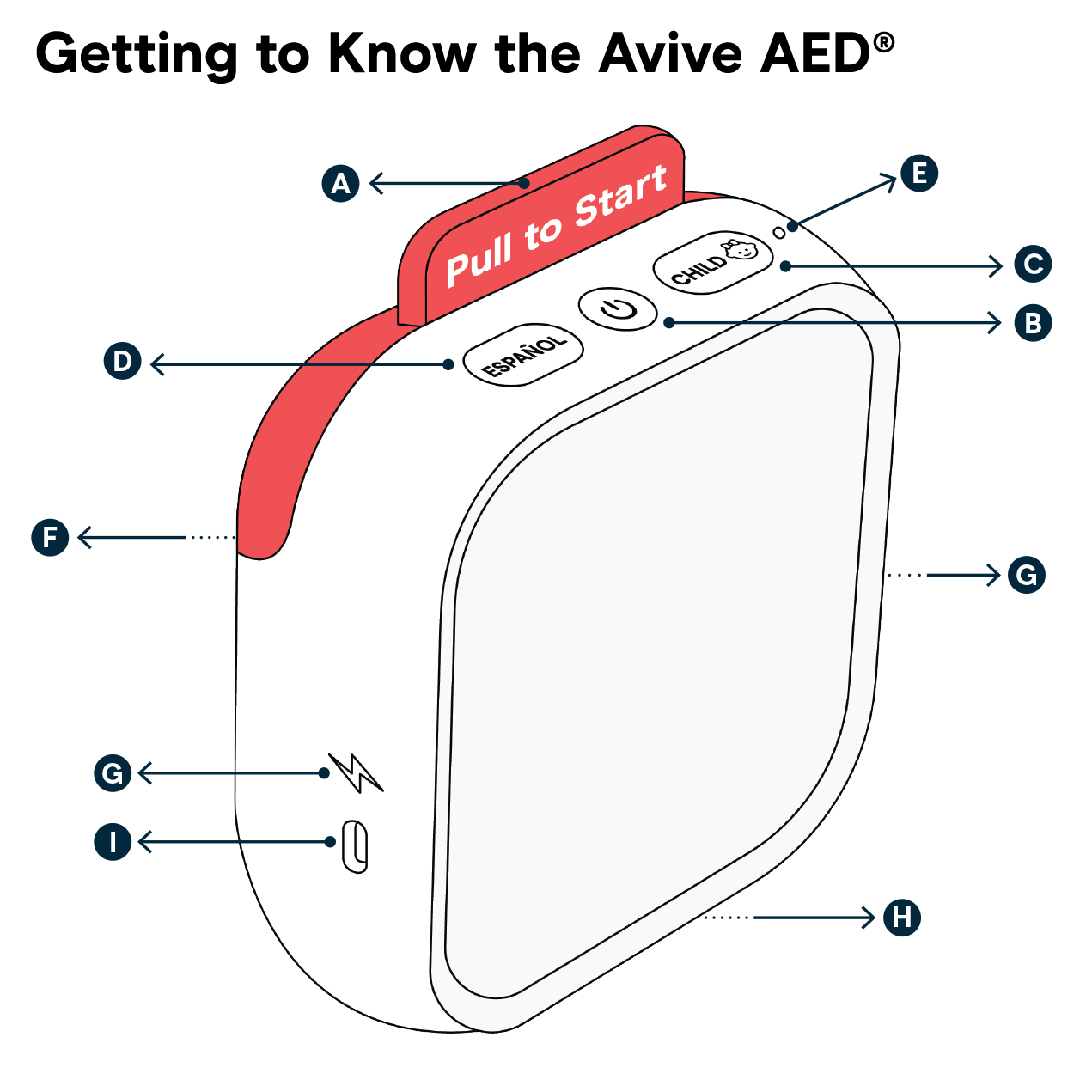
A. Red Tab
Pull the Red Tab to access the packaged pads in the Pad Cartridge and activate the Avive Connect AED for use.
IMPORTANT: Only pull the Red Tab in an emergency. If the packaged pads have been opened the Pad Cartridge will need to be replaced.
B. Power Button
Press the Power Button to turn on or turn off the Avive Connect AED.
C. Child Button
The Avive Connect AED defaults to Adult Mode. When treating children under 8 years old or under 55 lbs, it is important to press the Child Button to switch the device into Child Mode. Press the Child Button again to switch the device back to Adult Mode.
D. Español Button
By default, the Avive Connect AED provides audio instructions in English. Press the Español Button to switch the device to Spanish Mode, which will provide audio instructions in Spanish. Press the Español Button again to switch back to English Mode.
E. Status Light
If this light is blinking green, your device is ready to use! If it’s blinking red, then the Avive Connect AED needs attention.
F. Pad Cartridge
Self-adhesive pads used for treatment are stored in a sealed package within the Pad Cartridge. The pads are accessed by pulling the Red Tab out from the Pad Cartridge and peeling open the package.
IMPORTANT: The Pad Cartridge is single-use, disposable and must be replaced after the expiration date is reached or the Pad Cartridge has been used.
G. Stand Back Light
When this light is flashing – stand back, and do not touch the patient. The Stand Back Light flashes when the device is analyzing the patient’s heart rhythm or delivering therapy. It is important that no one touches the patient during this time.
H. Speaker
The Avive Connect AED provides audio instructions and notifications during use through this speaker.
I. USB Charging Port
The Avive Connect AED has a rechargeable battery. Use the USB Charging Port to connect the device to a charger in order to charge the AED.
How does Spanish Mode work?
The Avive Connect AED will provide audio instructions in English by default. If Spanish language is preferred, switch the device to Spanish Language by pressing the Español Button at the top.
When switched to Spanish Language, the device will verbally indicate in Spanish that it is in Spanish Mode, and the Español button will light up. To switch back to English language, press the Español Button again.
Does the Avive Connect AED work on children?
Yes, the Avive Connect AED has a Child Button on the top of the device that should be pressed when responding to patients between the ages of 1 year and 8 years.
Activate Child Mode by pressing the Child Button at the top of the device. By pressing the Child Button, you will lower the energy level of the shock delivered to 50 J, and the AED will also instruct you to place the electrode pads in different locations more appropriate for a child.
With Avive's universal Electrode Pads, the same pads can be used on both adults and children, their placement on the body is just different.
Learn more about pad placement.
Does the Avive Connect AED require separate child or pediatric pads?
The Avive Connect AED has universal electrode pads designed to respond to both adults and children, so you do not need separate child pads.
If you are responding to a patient who is less between the ages of 1 and 8 years old (or weighs less than 55 lbs.), the Avive Connect AED should be used in Child Mode.
Activate Child Mode by pressing the Child Button at the top of the device. By pressing the Child Button, you will lower the energy level of the shock delivered to 50 J, and the AED will also instruct you to place the electrode pads in different locations more appropriate for a child.