What are Nearby Emergency Alerts?
Nearby Emergency Alerts are real-time notifications that let your Avive Connect AED know when a cardiac emergency has been reported in your area. When an alert is received, your device can display information about the incident and direct you to the incident to provide lifesaving help before emergency services arrive.
This feature is designed to increase community response times and improve outcomes during sudden cardiac arrest events. You can learn more about our 4 Minute Community (4MC) program and Nearby Emergency alerts here.
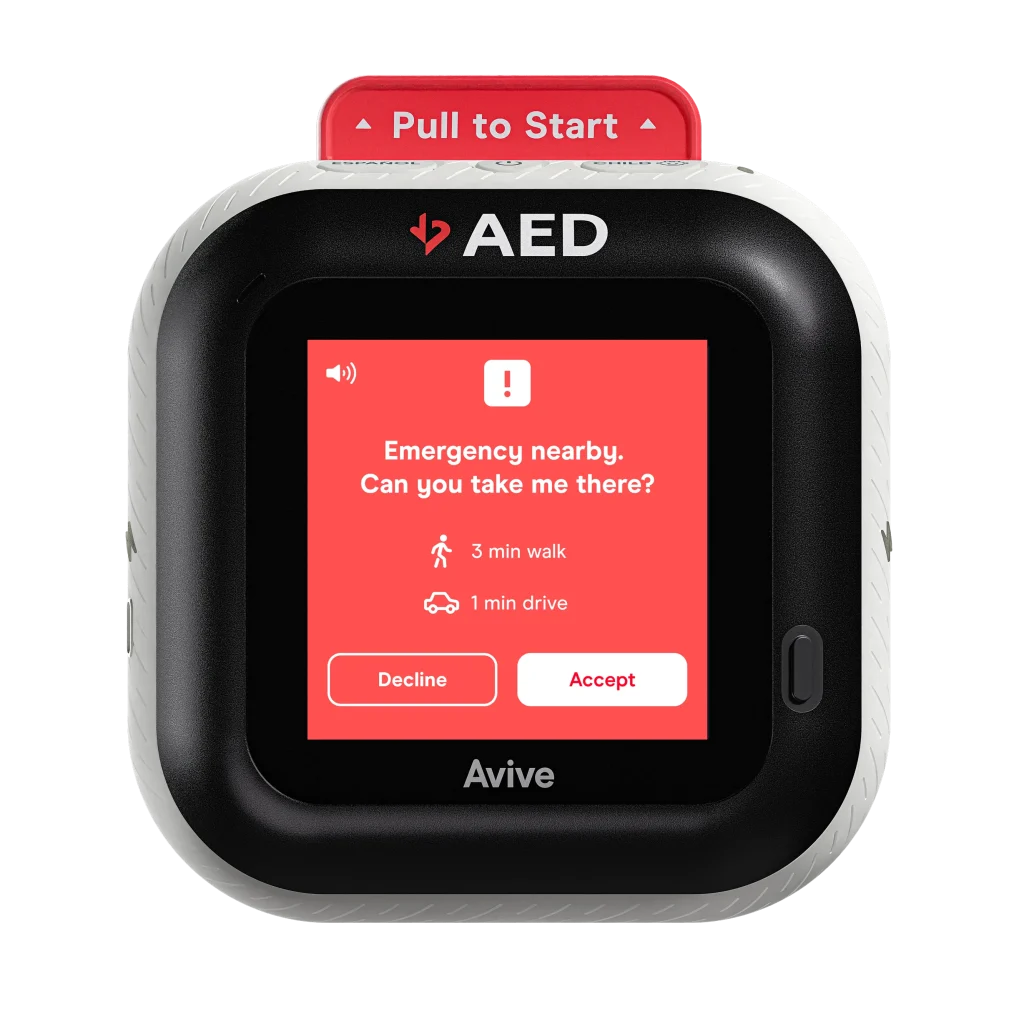
How do I enable or disable Nearby Emergency Alerts for my Avive Connect AED?
Nearby Emergency Alerts can be managed directly through your Avive Connect account.
To enable or disable this feature:
- Log in to your Avive REALConnect account.
- Navigate to the AED Settings page.
- Under Device Settings Nearby Emergency Alerts select Enable or Disable based on your preference.
💡 Tip: If you disable Nearby Emergency Alerts, your device will continue to function as a fully operational AED, but it will no longer receive notifications about nearby cardiac emergencies.
Will my Avive Connect AED receive Nearby Emergency Alerts?
Your Avive Connect AED will receive Nearby Emergency Alerts when all of the following conditions are met:
- Your device is Emergency Ready (the green light is flashing) and has cellular or Wi-Fi connectivity.
- Nearby Emergency Alerts are enabled in your AED settings.
- Your device is in High Power Mode OR plugged in.
- Your community Emergency Communications Center (ECC) is participating in Avive's 4 Minute Community or PAD+ Program.
- Your device is within the designated alert radius of a qualifying cardiac emergency.
How do I know if my community has Nearby Emergency Alerts or is part of a 4 Minute Community (4MC)?
To check if your community is part of a 4 Minute Community (4MC) or supports Nearby Emergency Alerts:
Check our list of active 4MCs here.
Contact Avive Support or your local AED program administrator.
💡 Note: Even if your community doesn’t currently have Nearby Emergency Alerts, your Avive Connect AED will still function normally as a fully connected and operational defibrillator.
Will I get notified about nearby emergencies by SMS text message if I do not have a Custom Alert Zone set up?
Yes - if you are a 4 Minute Community CARE Team Member or member of a PAD+ community. Users who are invited to join a 4 Minute Community or PAD+ community will see the option to enable Nearby Emergency SMS Alerts and set Custom Alert Zones in their REALConnect Profile page.
As long as you have enabled Nearby Emergency SMS Alerts in your REALConnect Platform and checked the box for Device Alerts on your Profile page, you will receive a text message for nearby emergencies! Make sure that the phone number you have entered in your REALConnect profile is a mobile number that can receive SMS.
Don't see this option in your REALConnect platform? Click here to reach out to the 4 Minute Community program leaders in your area to join the CARE Team in your area!
What information is shared with my 4 Minute Community when I accept a Nearby Emergency Alert?
If you receive Nearby Emergency Alerts as a part of a 4 Minute Community or an Avive PAD+ Program, your Organization’s contact information, including your Organization Name, Organization Phone number, and all responding device’s Primary Contact’s Names will be shared with your community’s leadership team during any active Nearby Emergency.
Your information is shared to help your 4 Minute Community leadership more easily identify the emergency and provide support during and after the incident.
What are Rapid Dispatch Alerts?
Rapid Dispatch Alerts are another way that your Organization can receive Nearby Emergency and SMS Alerts. Rapid Dispatch Alerts are designed to get to you and your device faster by using your device’s last reported location instead of waiting for its live location to update after an alert is sent. When enabled, Rapid Dispatch Alerts are sent if your device’s last known location is within the emergency alert radius and if the device’s location data is less than 24 hours old. This means that if your device was near the emergency within the last 24 hours, it will receive a Nearby Emergency Alert.
While Rapid Dispatch Alerts will improve the speed with which your device receives Nearby Emergency Alerts, for mobile devices that move around continuously, they may receive alerts for emergencies that they are no longer nearby. Enabling Rapid Dispatch Alerts will be most accurate for stationary devices, or semi-stationary devices that do not move locations frequently–for example, for devices stored in homes or businesses.
To enable Rapid Dispatch Alerts, log in to REALConnect > go to the Organization Settings Page > Fleet Settings > toggle on the Rapid Dispatch Alerts option. When toggled on, Rapid Dispatch alerts will be enabled for all devices within an Organization.
What are suggested locations for my Custom Alert Zones?
If you live in a 4 Minute City or PAD+ community, you have the option to set up to 5 Custom Alert Zones. These are locations where you’d like to receive a text message for active cardiac emergencies that are happening within a 1 mile radius of them, regardless of where your Avive Connect AED is located at the time of the emergency.
As a best practice, Custom Alert Zones should be set over your place of residence, and/or any other location(s) that your device is frequently kept, such as your place of work. This will help ensure that you will be alerted of nearby cardiac arrest emergencies in the fastest manner possible.
Here are a few common Custom Alert Zone locations for users in a 4 Minute City or PAD+ community:
- Place of residence
- Place of work
- Child’s school
- Spouse’s place of work
- Gym
Opt in and select up to 5 Custom Alert Zones in your REALConnect Platform.
I’m not getting Nearby Emergency SMS Alerts, but my settings in REALConnect are set up correctly.
If you aren't receiving Nearby Emergency SMS Alerts, but your REALConnect settings are configured correctly, your phone could be blocking one of the numbers Avive uses to send them. If you texted STOP to pause Nearby Emergency SMS Alerts at any time, you must text UNSTOP to one of the numbers above to initiate them again.
Try texting UNSTOP to each of the below phone numbers:
- 1(650) 661-0320
- 1(650) 266-8668
- 1 (650) 502-6403
If the problem persists, please reach out to support@avive.life or call 1 (800) 489-4428.
What phone number will Nearby Emergency SMS Alerts be sent from?
When you have Nearby Emergency SMS Alerts enabled and/or Custom Alert Zones set up, you will receive text messages from either 1 (650) 661-0320 or 1 (650) 266-8668 in the event of nearby emergencies. You may also receive a text from 1 (650) 502-6403, but this phone number is very rarely used.
We suggest saving these phone numbers as contacts in your phone so you recognize them more easily (like in the image below).
Will my Avive Connect AED receive a Nearby Emergency alert when it's not plugged into its charger?
Yes, as long as your Avive Connect AED is in High Power Mode and your device is nearby the emergency. Avive Connect AEDs that are plugged into their charging station and in High Power Mode will receive alerts the fastest since the screen does not have to go through its wake up process.
If you live in a 4 Minute City or PAD+ community and want to receive Nearby Emergency Alerts, make sure your device is set to High Power Mode. To do so, click on “Settings” on the Avive Connect AED and select “High Power Mode.”
How do I set up Custom Alert Zones for my device?
To enable or update your Custom Alert Zones, log in to your REALConnect account at realconnect.avive.life.
Navigate to your Profile by clicking on your name in the top right corner. To set up Custom Alert Zones, select the Custom Alert Zones option, then click Add Zone, and use the map to set up to five locations where you would like to receive Nearby Emergency text messages when a suspected cardiac arrest is occurring closeby. You will be unable to set Custom Alert Zones outside of the boundaries of your 4 Minute City or PAD+ Program.
Use the plus and minus signs on the side of the map to zoom in and out of your 4 Minute City or PAD+ community’s boundaries. Set up to five custom locations within the boundaries, which will be marked by a red border. Click Save in the top right corner of your Profile page to finalize your Custom Alert Zones.
To delete Custom Alert Zones or set new ones, click View and Edit Zones, then click on an existing pin to remove the zone. Drop a new pin within the 4 Minute City or PAD+ boundary to set up another zone!
Why did I receive a Nearby Emergency Alert SMS text message before my Avive Connect AED got an Nearby Emergency notification?
Sometimes you may receive a Nearby Emergency SMS Alert (text message) before your Avive Connect AED gets a notification. This happens because the process for sending SMS alerts to your phone is generally quicker than the process for sending alerts to your Avive Connect AED. To ensure you receive Nearby Emergency SMS Alerts quickly, set up Custom Alert Zones over your residence, your workplace, or any other location where your device is typically stationed.
For example, when you are inside a Custom Alert Zone (a static location that you have pre-set in your REALConnect Platform) you will receive a Nearby Emergency SMS Alert immediately. Shortly after, your device will need to check in with REALConnect to report its location. Then, if your device is within the emergency zone, you will receive a Nearby Emergency Alert on the screen of your Avive Connect AED.
To help your Avive Connect AED receive Nearby Emergency Alerts faster, make sure that your device is set to High Power Mode, connected to Wi-Fi and plugged into its charger whenever possible.
What is the difference between the default radius for Device Alerts and a Custom Alert Zone?
Default Radius for Device Alerts:
In your REALConnect Platform, if you enable Nearby Emergency SMS Alerts and check the box for Device Alerts, you will receive a text message and your Avive Connect AED will receive an alert when there is a cardiac arrest emergency occurring nearby your Avive Connect AED. The default radius is set to ensure that you are only alerted and asked to respond to an emergency when your device is within a reasonably close distance to it. Checking the box for Device Alerts provides multiple means of notification to help you arrive on the scene of a cardiac arrest emergency with your Avive Connect AED within 4 minutes of notificWhat are Custom Alert Zones?
Custom Alert Zones are enabled and set on the Profile page of your REALConnect Platform. allow you to select up to 5 locations in your community where you would like to know when a Nearby Emergency occurs - regardless of whether your Avive Connect AED is nearby at the time of the emergency. With the Custom Alert Zones you set, you will receive a text message alert when an active cardiac arrest emergency is occurring within 1 mile of the pin dropped location that you set.
Opt in and select up to 5 Custom Alert Zones in your REALConnect Platform.
Custom Alert Zone:
If you enable Custom Alert Zones, you have the option to choose up to 5 locations where you would like to receive notifications for Nearby Emergencies that occur - regardless of whether your Avive Connect AED is nearby at the time of the emergency. The goal of Custom Alert Zones is to notify you by text message when there is an emergency occurring at a location that you frequent - such as your home, place of work, school, etc.
Opt in and select up to 5 Custom Alert Zones in your REALConnect Platform.